
Understanding Voucher Eligibility Notes
Published 5 Jul 2026
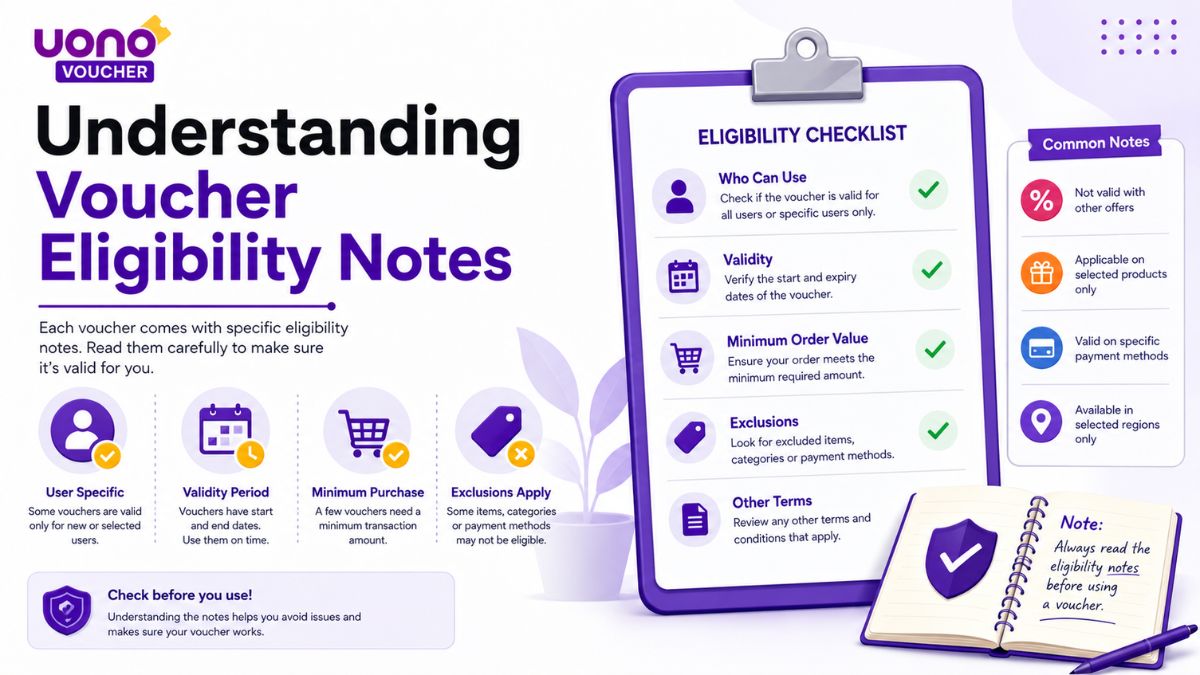
Most voucher records on UonoVoucher include a short eligibility note. These notes summarise conditions reported by readers, observed during a review or displayed within the relevant application.
An eligibility note is not the full set of terms established by the platform operator. It is a concise explanation intended to help readers identify the most important known restriction before attempting to use a voucher.
For example, New accounts only means the available evidence suggests that the voucher does not apply to accounts created before the eligible registration period. Existing users who try the same code should expect it to be rejected.
Subject to regional availability means the voucher has reportedly worked in some locations but not others, without enough consistent evidence to define the supported regions precisely.
When no eligibility note is present, this reflects missing or unconfirmed information. It does not mean that the voucher is unrestricted.
Always treat eligibility notes as a starting point rather than a guarantee.
What voucher eligibility means
Voucher eligibility determines whether a particular account is allowed to use a promotion.
A voucher may exist and remain active while still being unavailable to a specific reader. This can happen because the platform applies conditions based on:
- Account creation date
- Country or registered region
- Account status
- Previous voucher use
- Application version
- Device history
- Campaign invitation
- Registration method
- Redemption limits
- The date or time of the attempt
Eligibility is separate from validity.
A valid voucher is one that has not clearly expired or been withdrawn. An eligible account is one that meets the operator's requirements for using it.
A voucher may therefore be:
- Valid and available to your account
- Valid but unavailable to your account
- Expired for all accounts
- Limited to a selected group
- Unconfirmed because the conditions are unclear
Why eligibility notes are important
A code alone does not explain who can use it.
Two readers can enter the same voucher correctly and receive different results because their accounts do not have the same eligibility.
A clear eligibility note can help explain:
- Why the voucher worked for one reader but not another
- Whether the offer appears intended for new users
- Whether availability varies by region
- Whether previous redemptions affect access
- Whether an application update is required
- Whether the campaign is invitation-only
- Whether there is a known claim limit
Without this context, every failed redemption could be mistaken for expiration.
Eligibility notes help distinguish between a closed campaign and an account-specific restriction.
Eligibility notes at a glance
| Eligibility note | General meaning |
|---|---|
| New accounts only | The voucher appears limited to accounts created within an eligible period. |
| Existing users only | The offer appears intended for accounts that already existed before the campaign. |
| Selected users only | The platform appears to have made the offer available to a targeted group. |
| Subject to regional availability | Results vary by location, but the exact supported regions are not fully confirmed. |
| Available in selected regions | Evidence supports availability only in specifically identified locations. |
| One use per account | The same account is not expected to redeem the voucher more than once. |
| One use per device | Multiple accounts on the same device may not qualify separately. |
| App version required | The voucher may only appear or work in a supported application version. |
| Invitation required | The account may need to receive the campaign directly from the operator. |
| Limited claims available | The campaign may close after a fixed number of redemptions. |
| Registration-period restriction | The account must have been created during a particular date range. |
| Previous promotion restrictions apply | Accounts that used another offer may be excluded. |
| Eligibility unconfirmed | Current information is insufficient to identify the applicable conditions. |
The wording may vary slightly depending on the evidence available for a particular record.
1. New accounts only
New accounts only means the voucher appears intended for newly registered users.
The platform may define a new account as one that:
- Was created during the campaign period
- Has not completed a previous redemption
- Has not used another introductory voucher
- Was registered through an eligible page or invitation
- Is not linked to a previously used device
- Completed registration after the campaign began
The phrase does not always mean that every recently created account qualifies.
An account may still be rejected when:
- It was created before the qualifying period
- The device was used for an older account
- Another introductory promotion was already applied
- The registration path was not eligible
- The campaign limit was reached
- The account belongs to an unsupported region
Creating additional accounts should not be assumed to restore eligibility. Operators may apply restrictions across accounts, devices or verified account information.
2. Existing users only
Some promotions are designed for existing or returning users rather than new registrations.
An existing-user promotion may be offered to:
- Accounts created before a specified date
- Users returning after a period of inactivity
- Accounts with a particular history
- Users selected for a retention campaign
- Accounts that received an in-app message
- Users who did not previously claim a related offer
A newly created account may therefore be rejected even when the voucher itself is active.
Where evidence supports this restriction, the eligibility note should make clear that the voucher is not intended for general new-account use.
3. Selected users only
Selected users only means the promotion appears to be targeted rather than publicly available to every account.
A selected-user voucher may be distributed through:
- An in-app notification
- An account-specific promotion page
- A direct message from the platform
- An email sent to eligible users
- A returning-user campaign
- A limited test group
- A personalised account offer
A reader may find the code online but still be unable to use it because their account was not included in the campaign.
A successful report from one selected account does not establish universal availability.
When a voucher is known to be targeted, it should normally carry a Limited status or a clear eligibility note.
4. Subject to regional availability
This note is used when location appears to affect access, but the exact regional pattern has not been confirmed.
Evidence may show that:
- The voucher worked for readers in one country
- Readers elsewhere received a regional error
- The campaign appeared on one regional app version
- Availability changed according to the registered account location
- Different platform domains displayed different promotions
The phrase should not be interpreted as confirmation that the voucher works in the reader's region.
It means that regional differences have been observed or reported, but the available evidence is not precise enough to list every supported and unsupported location.
Readers should check the platform's current campaign details and their registered account region.
5. Available in selected regions
This wording is more specific than Subject to regional availability.
It may be used when current evidence supports availability in clearly identified locations, such as:
- One country
- A group of countries
- A particular state or territory
- Accounts registered through a regional application
- Users accessing a specified operator domain
Where known, the eligible locations should be listed in the record.
A regional eligibility note should be based on current evidence rather than assumptions drawn from the language, currency or appearance of the promotion.
6. One use per account
Many vouchers can be redeemed only once by the same account.
After a successful redemption, a second attempt may produce messages such as:
- "Already redeemed"
- "Offer previously claimed"
- "One use per user"
- "Promotion already applied"
- "Voucher limit reached"
These messages do not necessarily mean that the voucher has expired for everyone.
They normally indicate that the account has already used the offer or a related promotion.
A one-use restriction may also apply across a group of introductory vouchers. Using one code may make the account ineligible for another code in the same campaign category.
7. One use per device
A voucher may be restricted by device as well as account.
This can mean that:
- Only one eligible account may claim the offer from the device
- A device previously associated with another account may be excluded
- Reinstalling the application does not reset eligibility
- Creating another account on the same device may not create a new claim
Device-based restrictions are not always disclosed clearly in the code text.
When reader reports consistently show that account changes do not restore access on the same device, the record may include a device-related eligibility note.
A single failed attempt is not enough by itself to confirm a device restriction.
8. App version required
Some vouchers only work on a supported application version.
The campaign may require:
- The latest official update
- A specific minimum version
- A campaign-specific build
- The mobile application rather than the website
- The website rather than the application
- An Android or iOS version
- Installation through a supported official source
An older application may not display the voucher field or recognise a newly introduced campaign.
A newer version may also remove a promotion that was available in an older interface.
Readers should use official update channels and should not install an unfamiliar application package merely to access a voucher.
9. Invitation required
An invitation-only voucher is not generally available through public code discovery alone.
Eligibility may depend on:
- Receiving a direct in-app invitation
- Opening an account-specific link
- Registering through an approved referral
- Receiving a message from the platform
- Being added to a campaign group
- Accessing a personalised promotion page
Entering the code without the associated invitation may result in an eligibility error.
Where the invitation requirement is supported by current evidence, the record should not imply that the code is open to all users.
10. Limited claims available
Some vouchers remain available only until a fixed number of redemptions is reached.
Limits may apply:
- Across the entire campaign
- Per day
- Per region
- Per account type
- Per application version
- During a short time window
This means a voucher can stop working before its displayed expiry date.
For example, a campaign may state that it runs until 31 July but is available only to the first 5,000 eligible users. Once the claim allocation is exhausted, later attempts may fail even though the calendar date has not passed.
A limited-claims note should be treated as an availability warning, not a guarantee that claims remain.
11. Registration-period restriction
Some campaigns apply only to accounts created within a specific date range.
For example:
- Accounts created after the campaign began
- Accounts created between two stated dates
- Accounts registered before a cut-off date
- Users who joined through a temporary registration page
The account's age alone may not determine eligibility. The exact registration date may need to fall within the campaign window.
A voucher can therefore fail for both very old and very new accounts when they fall outside the defined period.
12. Previous promotion restrictions apply
A voucher may be unavailable because the account previously used another promotion.
Possible restrictions include:
- Only one introductory code per account
- Only one offer from a campaign group
- No access after using a referral benefit
- No combination with another active voucher
- Exclusion after receiving an automatically applied offer
A code rejected for this reason is not necessarily expired.
Review the account's promotion history and the operator's current terms before assuming that the voucher is no longer active.
13. Account verification may be required
Some promotions only become available after the account completes required verification steps.
Depending on the platform and region, this may include:
- Confirming an email address
- Confirming a mobile number
- Completing required account details
- Verifying the registered region
- Accepting current terms
- Completing an age or identity check where required
Only complete verification through the operator's official application or website.
Do not provide passwords, one-time codes, identity documents or payment information to an unrelated voucher page or unofficial support account.
An eligibility note may mention verification when it is clearly identified as a campaign requirement.
14. Account status restrictions
A voucher may be limited according to the status of the account.
Examples include:
- Active accounts only
- Accounts without restrictions
- Accounts in good standing
- Accounts not currently enrolled in another campaign
- Accounts that completed a required setup step
- Accounts that have not been suspended or closed
When an account has a broader access problem, the voucher error may reflect the account status rather than the campaign itself.
Readers should resolve account issues through the operator's official support channels.
15. Time-based eligibility
Eligibility can depend on more than the expiry date.
A voucher may only be usable:
- On a particular day
- During specific hours
- After a stated activation time
- Within a limited period after registration
- Before a daily claim allocation is reached
- During an event
- Within a specified period after receiving an invitation
Time-zone differences can also affect results.
A code may appear inactive when the campaign has not started in the operator's time zone or may close earlier than expected when the user assumes a different local time.
16. Redemption-method restrictions
A valid voucher may only work through a particular redemption process.
The operator may require it to be used:
- During registration
- After registration
- Through a dedicated voucher section
- Through an invitation page
- Inside the mobile application
- On the official website
- After opening a campaign notification
- Through an automatically applied promotional link
Entering a voucher into the wrong field may produce an invalid-code message even when the account is otherwise eligible.
A referral field, invitation field and voucher field may accept different types of codes.
17. Platform-specific eligibility
Similar platform or game names can create confusion.
A voucher may apply only to:
- One application
- One platform operator
- One regional version
- One official domain
- One game within a larger service
- A specific campaign page
A code should not be treated as transferable between separate applications merely because their names, icons or interfaces look similar.
Before relying on an eligibility note, confirm that the voucher record matches the exact platform being used.
18. Device and operating-system restrictions
Some campaigns may only support certain devices or operating systems.
Possible restrictions include:
- Android only
- iOS only
- Mobile application only
- Desktop website only
- A minimum operating-system version
- A supported device category
- No access through emulators or unsupported environments
A voucher may therefore be active for one reader and unavailable to another using a different device.
Where current evidence confirms this condition, the record should identify the relevant device or platform requirement.
19. Campaign membership requirements
Some vouchers are connected to a specific campaign group.
An account may need to be:
- Enrolled through a campaign page
- Registered using an eligible link
- Part of a returning-user campaign
- Included in a regional promotion
- Selected during a limited test
- Registered through a partner campaign
- Shown the promotion directly inside the account
Possessing the code does not necessarily place the account into the campaign.
This is a common reason why publicly shared targeted codes fail for readers who were not originally included.
20. Eligibility may change during a campaign
Voucher conditions are not always fixed.
An operator may:
- Narrow the supported regions
- Reduce the eligible account types
- Change the registration period
- Introduce a new application requirement
- Reduce the remaining claim quantity
- Remove access for existing users
- Convert a public offer into a targeted campaign
- Withdraw the promotion completely
This is why eligibility notes should be read with the last reviewed date.
An old eligibility note may no longer reflect the platform's current terms.
Eligibility notes and status labels
Eligibility notes and status labels serve different purposes.
The status label describes the current evidence about the record.
The eligibility note describes who or what appears to qualify.
For example:
| Status | Eligibility note | Interpretation |
|---|---|---|
| Active | New accounts only | The voucher appears current, but only eligible new accounts should expect access. |
| Limited | Selected users only | The promotion is available to a restricted account group. |
| Reported | Subject to regional availability | Regional differences have been reported but not fully verified. |
| Unconfirmed | Eligibility unconfirmed | Neither current availability nor the applicable conditions are clear. |
| Expired | New accounts only | The old campaign was once restricted to new accounts but has now ended. |
| Withdrawn | App version required | The promotion was associated with a version requirement but appears to have been removed early. |
An eligibility note does not override the status.
A voucher marked Expired should not be treated as usable simply because its eligibility note matches the reader's account.
What no eligibility note means
The absence of an eligibility note does not mean:
- All accounts qualify
- Every region is supported
- The voucher can be used repeatedly
- There are no app-version requirements
- No invitation is required
- The campaign has unlimited claims
- The code is guaranteed to work
It usually means that the available evidence does not identify a specific restriction confidently enough to publish.
The record may be updated later when clearer information becomes available.
Readers should still check the operator's current terms before attempting the voucher.
How eligibility notes are created
Eligibility notes may be based on:
- Current official promotion terms
- Information displayed inside the application
- Direct review by a team member
- Repeated reader reports
- Exact platform error messages
- Campaign dates
- Regional differences
- Account-type comparisons
- App-version observations
The strongest notes are supported by current official information or consistent direct evidence.
Reader reports can help identify a restriction, but one account result is not normally enough to establish a general rule.
Evidence considered during review
Official campaign terms
These may state:
- Eligible account types
- Supported regions
- Start and end dates
- Registration requirements
- App-version conditions
- Claim limits
- Exclusions
- Whether multiple offers can be combined
Official terms generally carry more weight than copied code lists or undated screenshots.
However, an old official page may remain visible after the campaign changes, so the information must still be checked for recency.
In-app information
An account may display:
- A targeted promotion notice
- A regional restriction
- An eligibility message
- An invitation requirement
- A claim-limit warning
- A registration-date condition
In-app evidence may be account-specific. A promotion visible to one account should not automatically be described as universally available.
Reader reports
Reader submissions can reveal patterns that are not clearly explained in published terms.
Reports are more useful when they include:
- Attempt date
- Country or region
- Account age
- Application version
- Exact message displayed
- Previous voucher use
- Whether the promotion appeared inside the account
Multiple consistent reports can support an eligibility note, but they should still be evaluated for account-specific differences.
Error messages
Messages such as the following can help identify eligibility conditions:
| Message | Possible meaning |
|---|---|
| New users only | Existing accounts are excluded. |
| Not available for this account | The offer may be targeted or account-specific. |
| Unavailable in your region | A geographic restriction applies. |
| Already redeemed | One-use limitations apply. |
| Update required | A supported application version may be necessary. |
| Invitation not found | The account may need a campaign invitation. |
| Offer limit reached | The campaign allocation may be exhausted. |
| Registration date not eligible | The account falls outside the required period. |
Generic messages such as Invalid code may not reveal the exact eligibility issue.
Why reader results may conflict
Conflicting results often indicate that eligibility differs between accounts.
For example:
- A new account succeeds while an existing account fails
- One country is supported while another is not
- One app version recognises the code
- A selected user sees the campaign inside the account
- A previous claimant receives an already-used message
- The claim limit is reached between two attempts
When the reason can be established, the record may receive a specific eligibility note and a Limited status.
When the cause remains unclear, the status may remain Reported or Unconfirmed.
How to read cautious wording
Eligibility notes sometimes use cautious phrases because the evidence is incomplete.
"Appears limited to"
This means the available evidence points to a restriction, but the exact condition has not been fully confirmed.
"Reported for new accounts"
This means reader reports support new-account availability, but direct verification or complete terms may be missing.
"Subject to regional availability"
This means regional variation has been observed without a complete supported-region list.
"Selected accounts may qualify"
This indicates possible targeted eligibility.
"App version may be required"
This means version-related differences have been reported but the exact minimum version may not be known.
"Eligibility unconfirmed"
This means the record does not have enough current evidence to identify who can use the voucher.
Cautious wording is intended to show uncertainty rather than hide it.
Eligibility notes are not guarantees
Even when an account appears to match the published eligibility note, redemption may still fail.
Other conditions may apply, including:
- Total claim limits
- Previous campaign use
- Account verification
- Device history
- A changed campaign period
- A temporary technical issue
- Unsupported registration method
- Additional unpublished restrictions
- Withdrawal by the operator
An eligibility note summarises known information. It cannot account for every platform decision or later campaign change.
The operator ultimately determines whether an account qualifies.
What to check before using a voucher
Before attempting a voucher, review:
- The current status label.
- The last reviewed date.
- The stated start and expiry dates.
- The eligibility note.
- The account's registration date.
- The registered country or region.
- Previous voucher use.
- The current application version.
- The correct redemption method.
- Any campaign message displayed inside the account.
A voucher should not be treated as generally available based on the code alone.
Understanding failed redemptions
A failed redemption may indicate:
- The voucher expired
- The offer was withdrawn
- The account is ineligible
- The code was already used
- The region is unsupported
- The application is outdated
- The claim limit was reached
- The code was entered incorrectly
- The wrong redemption section was used
- The platform is temporarily unavailable
The exact error message is important.
For example, Not eligible should not automatically be interpreted as Expired.
What readers should do when the eligibility note seems wrong
Readers can submit a correction when their result differs from the published note.
A useful report should include:
- The voucher or record name
- The date of the attempt
- Country or region
- Whether the account was new or existing
- Application or website version
- The exact message shown
- Whether another voucher was used previously
- Whether the promotion appeared inside the account
Do not include:
- Passwords
- One-time verification codes
- Payment details
- Identity documents
- Full account numbers
- Private recovery information
One conflicting report may trigger a review, but it may not immediately change the eligibility note without supporting evidence.
How eligibility notes are updated
A note may change when:
- Official terms are published
- A reviewer confirms a restriction
- Multiple consistent reports identify a pattern
- The platform changes the campaign
- A previously suspected restriction is disproved
- The offer becomes targeted
- Regional availability expands or narrows
- The required application version changes
- The campaign reaches its claim limit
Examples of updates include:
| Previous note | Updated note | Reason |
|---|---|---|
| Eligibility unconfirmed | New accounts only | Current terms identify a new-user requirement. |
| Subject to regional availability | India only | Supported location becomes clear. |
| Selected users only | Returning users only | The target group is confirmed. |
| App version may be required | Version 5.2 or later | A minimum supported version is identified. |
| Limited claims available | Claims closed | The allocation is confirmed as exhausted. |
| New accounts only | Eligibility unconfirmed | Current reports conflict and the earlier condition can no longer be verified. |
Eligibility notes should remain reversible when the evidence changes.
Common misunderstandings
"Active means I am eligible"
Not necessarily. Active means the promotion appeared current during a recent review. Account restrictions may still apply.
"No eligibility note means everyone qualifies"
No. It normally means that specific conditions have not been confirmed.
"A code worked for another reader, so it should work for me"
Different regions, account histories, devices and campaign groups can produce different outcomes.
"Not eligible means the voucher is fake"
No. The voucher may be genuine but restricted to another type of account.
"An expiry date guarantees availability until that date"
Not always. A promotion may end earlier because of claim limits or withdrawal.
"Creating another account guarantees new-user eligibility"
No. Platforms may apply restrictions across devices or related account information.
"Updating the app always fixes eligibility"
An update may be required for some promotions, but it cannot change every account restriction.
Eligibility review checklist for editors
Before publishing or changing an eligibility note, a reviewer should check:
- The exact voucher and platform
- The most authoritative current source
- The campaign dates
- The account type required
- Regional restrictions
- App-version requirements
- Previous-use exclusions
- Invitation requirements
- Claim limits
- The exact error messages reported
- Whether the evidence is current
- Whether the wording reflects uncertainty
- Whether the status label should also change
The note should describe only conditions supported by the available evidence.
It should not imply universal availability when the campaign is account-specific.
Reader eligibility checklist
Before deciding that a voucher should work for your account, confirm:
- The promotion is not marked Expired or Withdrawn
- The review date is recent
- Your account matches the stated account type
- Your registration date falls within the eligible period
- Your account is registered in a supported region
- The code has not already been redeemed
- You have not used a conflicting promotion
- The supported app or website version is being used
- The voucher is entered in the correct section
- Any required invitation is present
- The claim limit has not clearly been reached
- The platform is not experiencing a technical issue
Meeting these conditions may improve the likelihood of eligibility, but acceptance remains under the platform operator's control.
Editorial principles for eligibility notes
We separate availability from eligibility
A current voucher may still be limited to a specific group.
We avoid assuming universal access
One successful report does not prove that every account qualifies.
We make uncertainty visible
When the exact restriction is unclear, the note should use cautious wording or state that eligibility is unconfirmed.
We prioritise current evidence
Old campaign terms and screenshots should not determine a current eligibility note without additional verification.
We do not treat failure as expiration automatically
A rejection may reflect account restrictions rather than the end of the promotion.
We update notes when conditions change
Eligibility descriptions should not remain fixed when new evidence shows that the campaign has changed.
Final reminder
Voucher eligibility notes summarise known or reported account conditions. They do not reproduce every campaign term and do not guarantee that a voucher will be accepted.
New accounts only indicates that existing users are unlikely to qualify. Selected users only means the offer appears targeted. Subject to regional availability means results differ by location without a fully confirmed regional pattern.
When no eligibility note is shown, do not assume that the voucher is unrestricted. Check the status, last reviewed date, campaign terms and current information displayed by the platform.
The platform operator ultimately controls eligibility, availability and redemption decisions.
Read how we assign status labels and what to do when reader reports conflict, learn why a promo code may not work, check whether a Uono voucher has expired, review app permissions before installation, read our Code Review Policy, browse current voucher records or contact UonoVoucher directly.
Frequently Asked Questions
It is a brief summary of the most important known or reported conditions affecting who can use a voucher.
No. It is a concise summary. The operator's current campaign terms may include additional conditions.
It means the available evidence suggests that accounts created before the eligible registration period will not qualify.
The definition varies. It may depend on registration date, previous promotions, device history or the campaign registration method.
The offer appears to be targeted to accounts chosen by the operator, often through an in-app notification, invitation or personalised campaign.
It means the voucher has shown different results across locations, but the exact list of supported regions has not been fully confirmed.
No. Active describes the current promotion status, while the eligibility note describes the accounts that may qualify.
It means that no specific condition has been confirmed clearly enough to publish. It does not confirm unrestricted access.
Yes. Account age, region, previous use, app version, campaign selection and device history can affect eligibility.
Not necessarily. It normally indicates that the account does not meet one or more campaign conditions.
Yes. The claim allocation may be exhausted, the offer may be withdrawn or its eligibility rules may change.
Yes. Notes are updated when new terms, direct reviews or reliable reader reports provide better information.
The promotion may only be supported in a newer interface or campaign build. Use only official update sources.
Usually not. New-account offers are commonly limited to one redemption per account, device or campaign group.
Use the Contact page and identify the affected record. Include the date, region, account type, app version and error message without submitting sensitive account information.