
Why a Promo Code May Not Work
Published 18 Apr 2026 · Updated 20 Jun 2026
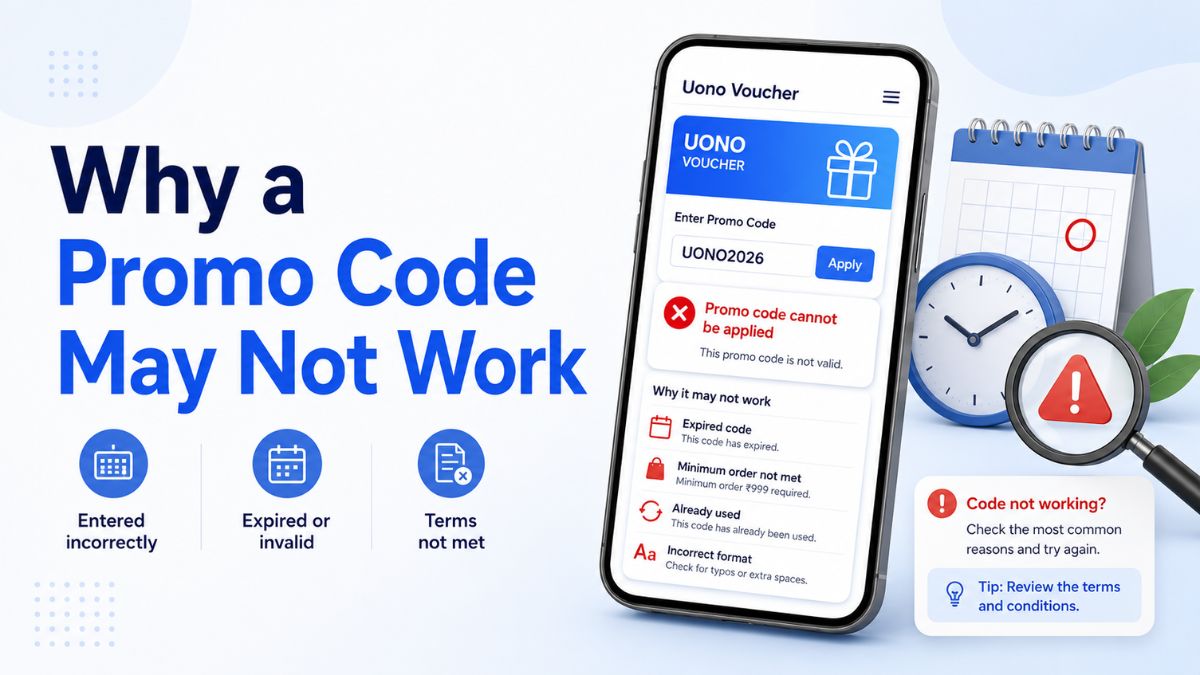
A promo code may fail even when it appears correctly written and has worked for another user. Codes can be restricted by location, account type, application version, eligibility rules, redemption limits or campaign dates that are not visible from the code itself.
Promo codes referenced on UonoVoucher are compiled from community reports and periodic manual reviews. They are not issued or guaranteed by UonoVoucher, and their availability is controlled entirely by the relevant platform operator.
A code marked Reported or Unconfirmed has not been independently verified as currently active. Even a recently reviewed code may not work for every user because platform eligibility can vary from one account to another.
This guide explains the most common reasons a promo code may fail, how to interpret error messages and what to check before trying again.
1. The promo code has expired
The most common explanation is that the promotion has ended.
A code may expire because:
- Its stated expiry date has passed
- The campaign reached its redemption limit
- The operator ended the promotion early
- The code was linked to a temporary event
- A newer campaign replaced it
- The platform withdrew the offer
The code may still appear in old articles, screenshots, social posts or community messages after it expires. Its continued visibility does not mean it remains redeemable.
Before using a code, check its current status, expiry date and last reviewed date.
| Status | What it means for the code |
|---|---|
| Scheduled | The promotion has been announced but may not have started yet. |
| Active | The code appeared available during a recent review. |
| Limited | The code may only work for selected users or under specific conditions. |
| Reported | The code was submitted or mentioned but has not been fully confirmed. |
| Unconfirmed | There is not enough recent evidence to confirm its availability. |
| Expired | The validity period appears to have ended. |
| Withdrawn | The promotion was removed or discontinued. |
An Active status is not a guarantee. The platform may still reject the code when an account does not meet the campaign requirements.
2. The promotion has not started yet
Some promo codes are published before their official activation time.
A scheduled code may only become usable:
- On a particular date
- During a defined event
- At a specific time
- After a platform update
- After an account receives an eligibility notice
Trying the code before the opening time may produce messages such as:
- "Invalid promo code"
- "Promotion unavailable"
- "Code not active"
- "Please try again later"
Check the campaign start date as well as its expiry date. Time-zone differences can also affect when a promotion begins.
3. The code is restricted to a particular region
A promo code can be active in one country or region and unavailable in another.
Regional restrictions may be based on:
- The account's registered country
- The user's verified location
- The application version installed
- The platform domain being used
- Local campaign availability
- Language or currency settings
Changing a device setting does not necessarily change an account's registered region. Platforms may use several account and location signals when determining eligibility.
A code reported as working by another user may therefore still be unavailable to your account.
4. The code is limited to new accounts
Many promotions are intended only for newly registered users.
A "new user" may be defined by the platform as an account that:
- Was created during a particular campaign period
- Has not previously redeemed another introductory code
- Has not been connected to an existing device
- Has not completed a specified account action
- Was created using an eligible referral or registration path
Creating another account may not restore eligibility. Platforms can associate accounts through verified details, devices or other account information.
Check the original promotion terms rather than assuming that every recently created account qualifies.
5. The code is available only to selected users
Some promotions are targeted rather than public.
A code may be limited to:
- Invited users
- Returning users
- Inactive accounts
- Selected account groups
- Users who received an in-app notification
- Members of a particular campaign
- Accounts meeting specific activity requirements
These are sometimes described as targeted, personalised or account-specific promotions.
A targeted code may be genuine but still fail for users who were not selected. In this situation, the code should be treated as Limited, not universally active.
6. The code has already been redeemed
Many promo codes can only be used once per account.
A platform may display an error when:
- The same code was used previously
- Another introductory code has already been claimed
- The promotion allows only one redemption from a campaign group
- The code is restricted to one redemption per device
- The account has already received the related benefit automatically
Review the account's promotion history, notifications or transaction records before attempting the code again.
A code that has already been redeemed usually cannot be reset through repeated submissions.
7. The code has reached its total usage limit
Some promotions are available only to the first specified number of eligible users.
For example, a campaign may be limited to:
- The first 1,000 redemptions
- A fixed number of claims per day
- A defined quantity for each region
- A short promotional period
- Availability while the campaign allocation lasts
In these cases, the displayed end date may not guarantee that the code will remain available until that date.
A promotion can close early once the claim limit is reached.
8. The promo code was entered incorrectly
Codes can be rejected because of small typing errors.
Check for:
- Missing letters or numbers
- Accidental spaces before or after the code
- Incorrect uppercase or lowercase characters
- Confusing characters such as O and 0
- Confusing characters such as I, l and 1
- Punctuation copied with the code
- A line break added during copying
- An incomplete code from a cropped screenshot
Where a copy button is available, use it instead of entering the code manually. After pasting, check that no extra spaces were added.
Do not modify the code unless the original source confirms an alternative format.
9. The code belongs to a different platform or application
Similar platform names can cause confusion.
A promo code may be valid only for:
- A specific application
- One regional version of an application
- A particular website domain
- A related but separate platform
- A limited campaign page
- One product within a larger platform
Confirm that the promotion name, application name and domain match the service you are using.
A code should not be assumed transferable between platforms simply because their names or interfaces appear similar.
10. The application version is not supported
Some codes only work on a particular application build.
A platform may require:
- The latest official version
- A campaign-specific update
- Installation from a supported source
- A particular mobile operating system
- Use of the website instead of the application
- Use of the application instead of the website
An outdated application may not recognise a recently introduced code. Conversely, an old campaign may have been removed from the newest version.
Use only official update channels. Do not install files from an unverified page solely to access a promotion.
11. The code requires a specific redemption method
Not all codes are entered in the same location.
A platform may require the code to be submitted:
- During account registration
- On a dedicated promotion page
- In an in-app redemption section
- Through a campaign invitation
- After completing an eligibility step
- Before a particular account action
- Through an automatically generated promotional link
A valid code may fail when entered in the wrong field. For example, a referral field may not accept a voucher code, and a voucher field may not accept an invitation identifier.
Read the original instructions and confirm that the platform interface still matches them.
12. The promotion has additional eligibility conditions
A code may be active but require other conditions to be met.
Possible conditions include:
- Account verification
- A minimum account age
- Registration during a specified period
- Use of an eligible device
- Completion of a particular step
- Acceptance of updated terms
- Participation through a designated campaign page
- Compliance with regional rules
The code text alone does not reveal these conditions.
Review the full campaign terms rather than relying only on a code copied from a list or screenshot.
13. The account information is incomplete
Some promotions are unavailable until required account details have been completed.
The platform may require:
- A verified email address
- A verified mobile number
- Confirmation of the account region
- Completion of an age or identity check where applicable
- Acceptance of the current platform terms
- Resolution of an account restriction
Only provide account information through the platform's official interface. A promo-code page should never ask you to send a password, one-time verification code or other private login information to a third party.
14. The code conflicts with another promotion
Some offers cannot be combined.
A code may fail when:
- Another promotion is already active
- The account previously selected a different campaign
- Only one introductory offer is allowed
- Two codes belong to the same promotion group
- The account automatically received an alternative offer
Check whether the platform permits multiple promotions to be applied together.
Do not cancel an existing offer unless the platform clearly explains what will happen and whether the action can be reversed.
15. The promotion was changed or withdrawn
Platforms may change campaign rules after a code is published.
Changes can include:
- An earlier closing date
- Narrower regional availability
- Revised eligibility rules
- A lower redemption limit
- Removal of certain account types
- Replacement of the original code
- Complete withdrawal of the promotion
This is why the last reviewed date is important. A code that was verified previously may no longer reflect the current campaign conditions.
Where the original promotion can no longer be found, treat the code as unconfirmed until current information is available.
16. The platform is experiencing a temporary technical issue
A code can sometimes fail because of a temporary service problem rather than because the promotion has ended.
Possible issues include:
- Server maintenance
- Delayed campaign activation
- An unavailable redemption page
- Account data not synchronising correctly
- Application errors
- Temporary service interruptions
Signs of a technical problem may include:
- Several platform features failing at once
- A blank promotion page
- Repeated loading errors
- An official maintenance notice
- The same error affecting multiple users
Wait until the platform is operating normally before trying again. Avoid submitting the same code continuously, as repeated attempts are unlikely to resolve a service-side issue.
17. The code may be false, altered or misleading
Not every code shared online comes from a reliable source.
Be cautious when a code:
- Has no publication or review date
- Cannot be traced to an original announcement
- Appears only in a cropped screenshot
- Is promoted with unrealistic guarantees
- Requires visiting an unrelated domain
- Asks for payment before it can be activated
- Asks for a password or one-time verification code
- Requires downloading an unofficial application
- Appears on many copied pages without supporting evidence
A code can be widely repeated and still be outdated or inaccurate.
Community reports can be useful as a starting point, but they should not replace current platform information.
Understanding common error messages
The wording varies between platforms, but the error message can help identify the problem.
| Error message | Possible meaning |
|---|---|
| Invalid code | The code may be mistyped, unsupported or no longer recognised. |
| Expired code | The promotion period has ended. |
| Code not active | The promotion may not have started or may have been disabled. |
| Not eligible | The account does not meet one or more campaign conditions. |
| Already redeemed | The code or a related offer was previously used. |
| Usage limit reached | The campaign's total or daily claim limit may have been reached. |
| Unavailable in your region | The promotion is geographically restricted. |
| Promotion not found | The code may belong to another platform or a removed campaign. |
| Try again later | There may be a temporary technical issue. |
Generic messages such as Invalid code do not always reveal the exact reason. Check the campaign terms and account eligibility before concluding that the code is false.
What to check before trying the code again
Use the following order:
- Confirm that the code was copied correctly.
- Check its status on UonoVoucher.
- Compare the stated expiry date with today's date.
- Review the last reviewed date.
- Confirm that the code belongs to the correct platform.
- Check regional and account restrictions.
- Confirm that the code has not already been used.
- Look for an in-app promotion notice.
- Check whether the platform is under maintenance.
- Consult the platform's official support information when the reason remains unclear.
If the code continues to fail, do not submit it repeatedly. Repeated attempts do not normally change eligibility or restore an expired campaign.
What UonoVoucher status labels do and do not mean
UonoVoucher status labels are intended to describe the available evidence for a code at the time of review.
An Active label means that the promotion appeared current during a recent check. It does not mean:
- Every account will qualify
- The code has unlimited redemptions
- The offer cannot be withdrawn
- The campaign is available in every region
- The platform guarantees a particular outcome
A Reported label means that information has been received from a user or source but still requires verification.
An Unconfirmed label means there is insufficient current evidence to classify the code as active or expired.
An Expired or Withdrawn code may remain visible as a historical record. Its presence should not be interpreted as a recommendation to attempt it.
Promo-code troubleshooting checklist
Before deciding that a code is unusable, confirm that:
- The code is entered exactly as displayed
- There are no extra spaces or punctuation marks
- The promotion has already started
- The expiry date has not passed
- The claim limit has not been reached
- The account is in an eligible region
- The promotion supports the current account type
- The code has not already been redeemed
- The correct platform and application are being used
- The application version is supported
- All required account steps are complete
- No conflicting promotion is already active
- The platform is not experiencing an outage
- The code can be traced to a credible source
Final reminder
A promo code may fail for many reasons, and expiration is only one possibility.
The code may be restricted to selected accounts, specific regions, new users, particular application versions or a limited number of redemptions. It may also have been entered incorrectly, used previously, withdrawn early or affected by a temporary platform issue.
Start with the status label, expiry date and last reviewed date. Then compare the code against the current promotion details shown by the platform.
When reliable information is unavailable, treat the code as Unconfirmed rather than assuming it is active.
For more, read check whether a Uono voucher has expired, learn how to verify a gaming platform, browse current voucher records, view available promo-code records and understand voucher status labels.
Frequently Asked Questions
The other user may have a different account type, registered region, application version or campaign eligibility. Some codes are targeted and are not available to every account.
Not necessarily. The code may be mistyped, expired, already used, restricted or entered in the wrong section. Check the full promotion conditions before reaching a conclusion.
Yes. Some promotions close when a redemption limit is reached or when the operator withdraws the campaign. The displayed date may be the latest possible end date rather than guaranteed availability.
It means the promotion may only work for selected users, regions, account types or campaign groups. It should not be treated as universally available.
Reported means that a code or status update has been submitted or observed, but it has not yet been independently confirmed as currently active.
No. First check the error message, code format, account eligibility and campaign status. Repeated attempts will not usually restore an expired or unavailable promotion.
Possibly, when the campaign requires a supported version. Only update through an official source, and do not install an unverified application solely to access a code.
Expired codes may remain visible as historical records. This helps users identify old codes and understand why they are no longer expected to work.
Many codes are limited to one redemption per account, device or campaign. The exact restriction depends on the platform's terms.
The platform operator controls availability, eligibility, campaign limits and redemption decisions. UonoVoucher documents reported and reviewed information but does not issue or activate the codes.